Are you a budding game developer on Roblox looking to share your creations with the world? This comprehensive guide offers essential steps and expert tips on how to publish your Roblox game successfully. From initial setup in Roblox Studio to optimization, testing, and promotion, we cover everything busy gamers need to know. Discover how to navigate privacy settings, understand monetization options like developer products and game passes, and ensure your game stands out in the bustling Roblox universe. Learn best practices for performance, audience engagement, and community building. This resource is tailored for creators balancing gaming with life's other demands, providing actionable advice to get your game live and thriving. We address common challenges like technical hurdles and visibility, helping you transform your game ideas into playable experiences for millions. Whether you are a beginner or looking to refine your publishing strategy, this guide provides the foundational knowledge to launch your Roblox game confidently and effectively.
How do I publish my game on Roblox Studio?
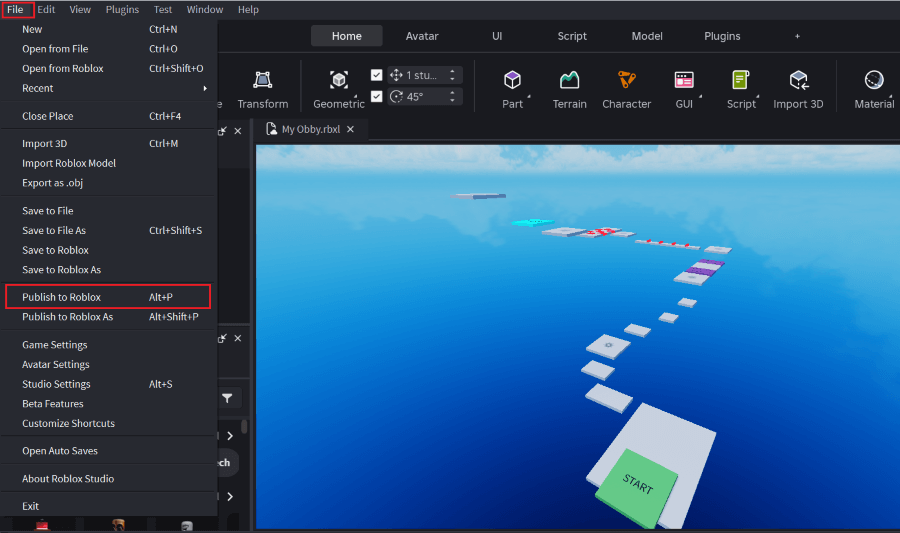
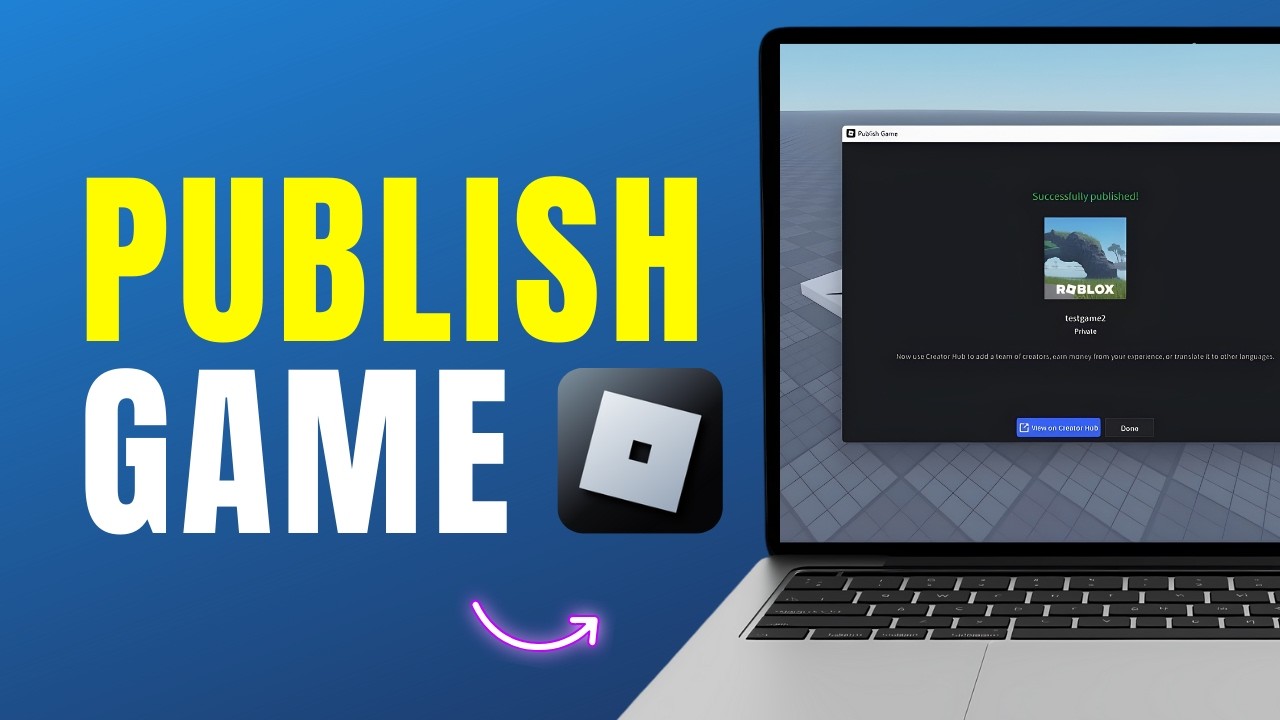
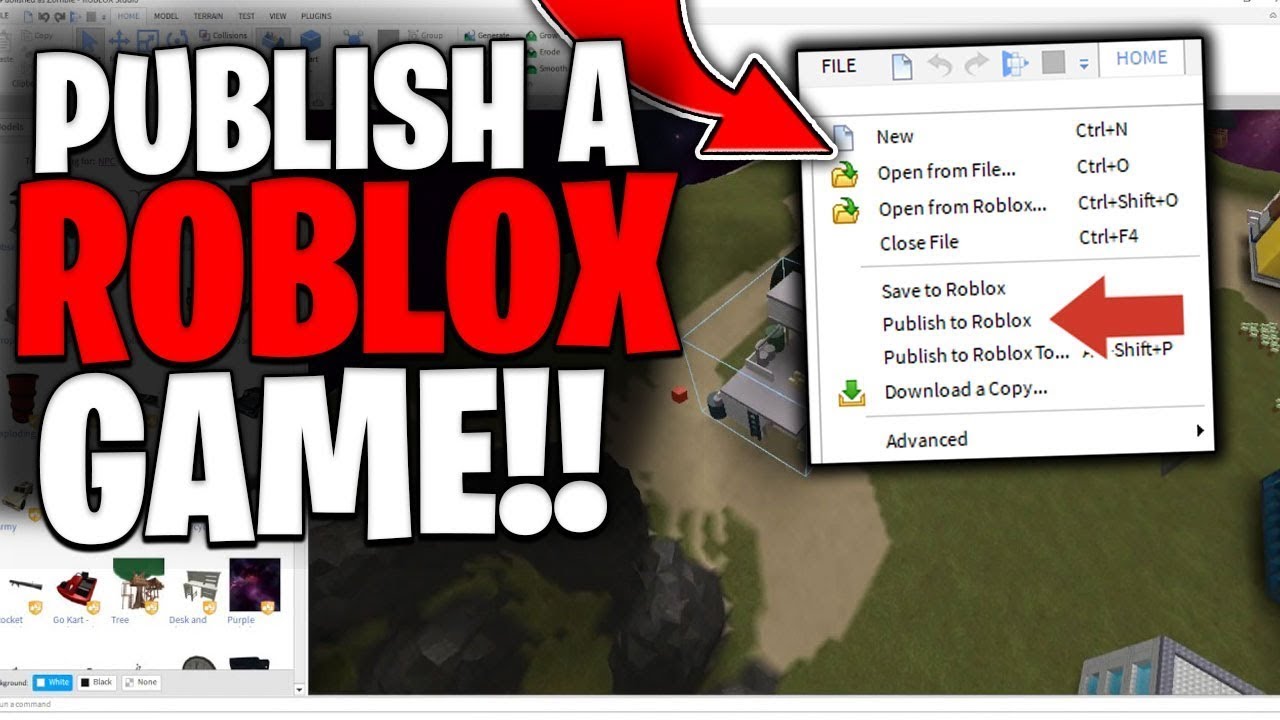
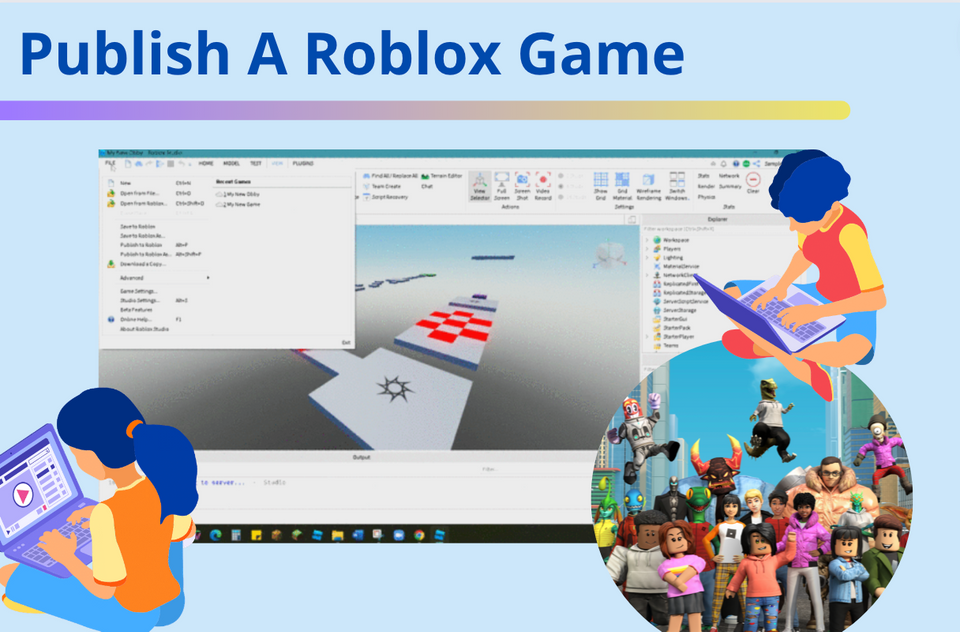
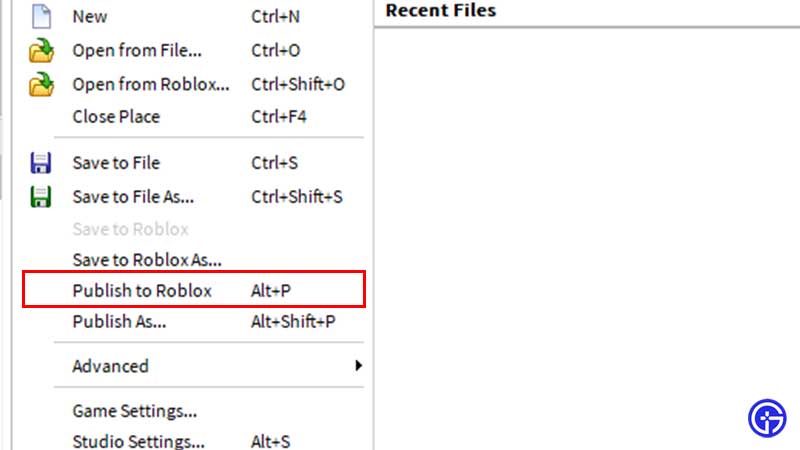
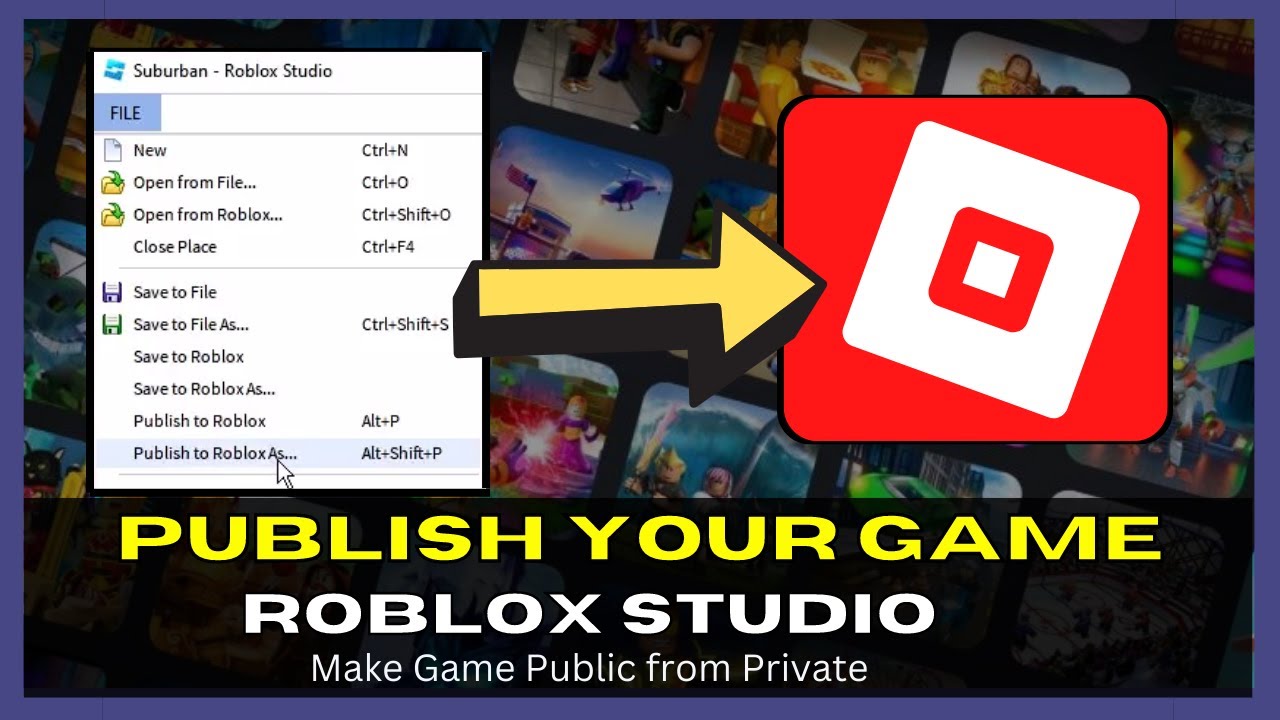
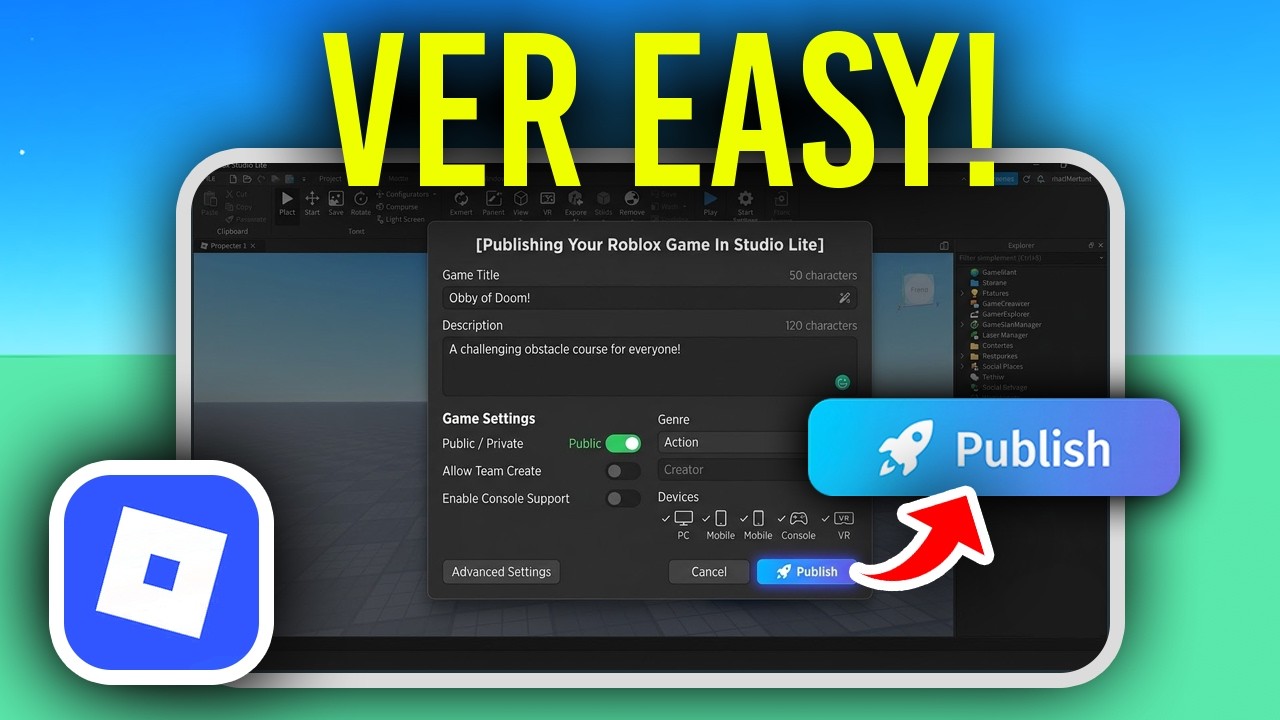
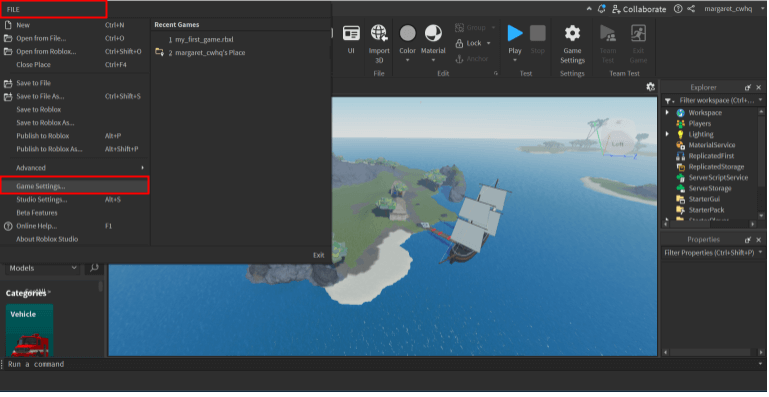
To publish your game, open it in Roblox Studio, go to the 'File' menu, and select 'Publish to Roblox As...' for a new game, or 'Publish to Roblox' for updates. You'll then fill in details like title, description, and platform support. Ensure the game is set to 'Public' in 'Configure Place' settings for others to play it. This simple process makes your creation accessible to millions of players, allowing you to share your unique game concepts.
What are the requirements to publish a game on Roblox?
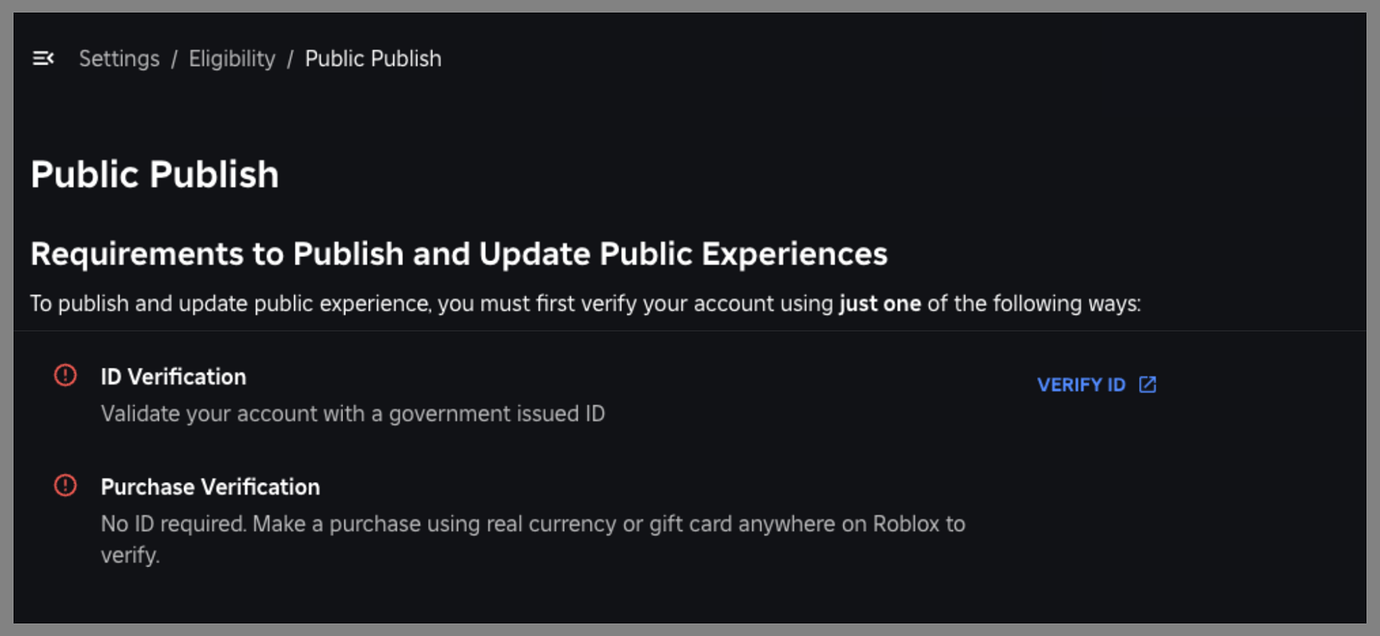
The primary requirements are having a Roblox account and Roblox Studio installed. There are no strict technical hurdles or approval delays for publishing itself. Your game must comply with Roblox's Community Standards and Terms of Use regarding content, but most functional games can be published immediately. A stable internet connection is also necessary to upload your game to the platform. Focus on creating an engaging, safe experience.
Can I make money if I publish a game on Roblox?
Yes, absolutely! Many creators monetize their Roblox games through various methods. These include selling Game Passes (permanent perks), Developer Products (consumable items), and earning Premium Payouts based on time Roblox Premium subscribers spend in your game. You can also set up private servers for a fee. Successful monetization requires a fun, engaging game that provides value to players, encouraging them to spend Robux responsibly.
How do I update a published Roblox game?
To update your published Roblox game, simply make your desired changes in Roblox Studio, save your work, and then go to 'File' > 'Publish to Roblox'. This action will automatically replace the existing live version of your game with your latest changes. Players in the game might be prompted to rejoin for the updates to take effect. Regular updates, bug fixes, and new content are crucial for maintaining player interest and growing your game's community.
What privacy settings should I use when I publish my Roblox game?
When you publish, you'll typically set your game to 'Public' so anyone can play. However, you can adjust privacy settings at any time through your game's 'Configure Experience' page on the Roblox website. Options include 'Private' (only you can access), 'Friends Only' (accessible to your Roblox friends), or 'Public'. It's best to start private for testing, then switch to public when ready for launch. Always review settings to ensure your game's intended visibility.
Is it difficult to publish a Roblox game for beginners?
Publishing a Roblox game is surprisingly straightforward for beginners once the game is built. Roblox Studio provides intuitive tools, and the 'Publish to Roblox' function is easy to locate and use. The real challenge for beginners lies in game development itself – learning scripting, building, and design principles. However, the act of publishing is simplified, making it accessible even for those new to creation, encouraging more users to share their first projects.
What steps are crucial before I officially publish my Roblox game?
Before hitting publish, it's crucial to optimize performance, thoroughly test for bugs, ensure all game mechanics function as intended, and create compelling game icons and descriptions. You should also configure your privacy settings, and if applicable, set up monetization options. Getting feedback from a small group of testers is highly recommended to catch issues you might have missed. These steps ensure a polished, engaging, and ready-to-play experience for your audience.
How do I ensure my Roblox game is visible to players after publishing?
Visibility after publishing relies on several factors: a catchy title, an engaging icon and thumbnail, and a detailed description. Promote your game on social media, engage with the Roblox community, and consider using Roblox's advertising system. Regular updates and in-game events can also boost visibility by keeping your game fresh and attracting new players through organic discovery and word-of-mouth. Player retention also plays a significant role in how Roblox's algorithms rank your game.
What is the best way to get feedback on my Roblox game pre-publish?
The best way to get pre-publish feedback is through a small, dedicated group of testers. Share private links to your game with friends, family, or a trusted community on platforms like Discord. Provide clear instructions on what you want them to test and ask specific questions about gameplay, bugs, and overall experience. Offering incentives for detailed feedback can also be effective. This targeted feedback helps refine your game significantly before a wider launch.
Are there any costs associated with publishing a game on Roblox?
No, there are no direct costs to publish a game on Roblox. Roblox Studio is free, and the act of uploading your game to the platform and making it public is also free. However, if you choose to promote your game using Roblox's advertising system or want to upload custom assets beyond free allowances, those may incur Robux costs. For basic publishing, it remains a free endeavor for all creators.
How long does the publishing process typically take for a Roblox game?
The actual technical publishing process, once your game is ready, is almost instantaneous. After clicking 'Publish to Roblox', your game typically becomes available within seconds to minutes. The longer process is the development itself, including building, scripting, testing, and optimizing. Roblox does not have a lengthy manual review process for game approval before publishing, though content is subject to automated and manual moderation post-publication.
What kind of support is available if I encounter issues when I publish my Roblox game?
If you encounter issues, Roblox offers several support avenues. The official Roblox Developer Hub provides extensive documentation, tutorials, and a vibrant developer forum where you can ask questions and get help from other creators. You can also submit a support ticket directly to Roblox Support for specific account or technical issues. Many online communities and YouTube tutorials also offer valuable assistance, making troubleshooting manageable.
Hey there, fellow gamer! Ever poured your heart and soul into creating something amazing in Roblox Studio, only to feel a little lost when it comes to actually sharing it with the world? You are definitely not alone. Many of us, balancing careers, families, and life's endless quests, find our precious gaming and creation time limited. The dream of seeing others enjoy our game is real, but the path to publishing can seem like an epic boss battle in itself. This guide is built for you, the dedicated creator who wants to publish a Roblox game without getting bogged down in confusing technicalities or endless searches.
In 2026, the gaming landscape is more vibrant and accessible than ever. With 87% of US gamers regularly diving into virtual worlds, often for 10+ hours a week, and mobile gaming continuing its dominance, platforms like Roblox offer unparalleled opportunities for creators. But simply making a game isn't enough; getting it seen and played requires smart strategies. We'll walk through everything from preparing your masterpiece for launch to optimizing its performance, engaging your audience, and even exploring monetization options. Our goal is to make the process of how to publish your Roblox game clear, concise, and conquerable, so you can spend less time troubleshooting and more time enjoying your creative journey and the joy of sharing it.
How do I prepare my Roblox game for publishing?
Before you hit that publish button, thorough preparation is crucial. Think of it as gearing up your character for a raid; you wouldn't go in without the best armor and weapons, right? Start by refining your game's core mechanics and ensuring all levels or zones are complete. Pay close attention to potential bugs, glitches, or broken scripts. A polished experience right from the start significantly impacts player retention and initial reviews. Ensure all assets, models, and scripts are optimized for performance, meaning they are efficient and won't cause lag, especially for players on mobile devices or older hardware. Remember, a smooth experience is paramount for engaging today's diverse gaming audience, many of whom are busy adults seeking hassle-free entertainment.
What are the technical steps to publish a Roblox game on the platform?
Publishing your game on Roblox is a straightforward process once you're ready. First, open your game in Roblox Studio. Navigate to the 'File' menu in the top left corner. Select 'Publish to Roblox' or 'Publish to Roblox As...'. If it's a new game, you'll choose 'Publish to Roblox As...' and fill in details like the game's title, description, and genre. You'll also need to select the appropriate platform (PC, Phone, Tablet, Console, VR) your game supports. For existing games, 'Publish to Roblox' will overwrite the current live version. Always make sure your game is set to 'Public' in the 'Configure Place' settings under the 'Permissions' tab if you want others to play it. This ensures your hard work is accessible to the global Roblox community.
How can I ensure my Roblox game is optimized for performance?
Performance optimization is key to player enjoyment and retention. Nobody likes a laggy game. In Roblox Studio, use the 'Developer Console' (accessed via F9 during testing) to monitor client and server performance. Look for high script activity, excessive physics calculations, or large numbers of parts. Optimize your game by reducing unnecessary parts, simplifying complex models, and using efficient scripting. Consider breaking up larger games into smaller 'places' that players can teleport between, reducing the memory footprint. Utilizing Roblox's built-in 'LOD' (Level of Detail) settings for models can also significantly improve performance on lower-end devices. Remember, a well-performing game respects a player's time and hardware, a critical factor for busy adult gamers who value smooth, immediate fun.
What are the best practices for testing my Roblox game before publishing?
Rigorous testing prevents frustrating launch-day issues. Start by thoroughly playtesting your game yourself, focusing on every mechanic, quest, and interaction. Don't just test functionality; test for fun factor and clarity of objectives. Next, recruit friends, family, or a small group of trusted testers to play your game. Ask them to look for bugs, provide feedback on gameplay, and identify areas of confusion or boredom. Utilize Roblox Studio's 'Test' tab to simulate various player counts and device types (PC, mobile) to catch performance bottlenecks. Implement a feedback system, even a simple one like a Discord server or a Google Form, to collect organized input. This iterative testing process ensures a much smoother and more enjoyable experience for your wider audience upon launch.
How can I make my Roblox game appealing to a wider audience?
To capture a broad audience, especially in today's diverse gaming world, focus on accessibility and engaging content. Create a captivating game icon and thumbnail that accurately represent your game and stand out in the crowded Roblox game list. Write a clear, enticing description highlighting your game's unique selling points. Consider popular genres like social hangouts, obstacle courses, or simulation games, which currently see immense engagement, particularly among the 60% of gamers who value social play. Implement clear tutorials or onboarding for new players to reduce the learning curve. Add diverse customization options for avatars and spaces, allowing players to express themselves. Regular content updates and events keep players coming back, fostering a vibrant community around your creation.
What are the monetization options when I publish my Roblox game?
Roblox offers several ways to monetize your game, allowing creators to earn Robux. The primary methods include:
- Game Passes: One-time purchases that grant permanent in-game abilities, items, or access to special areas.
- Developer Products: Consumable items like in-game currency, temporary power-ups, or single-use items.
- Premium Payouts: Earn Robux based on the engagement of Roblox Premium subscribers in your game. The more Premium players spend time in your game, the more you earn.
- Private Servers: Players can rent private servers for a monthly Robux fee, offering a custom experience with friends.
How do I promote my Roblox game effectively after it's live?
Launching your game is just the beginning; effective promotion is crucial for visibility. Share your game link across social media platforms like X, TikTok, and Discord, highlighting unique gameplay moments or exciting features. Create short, engaging video clips or trailers to capture attention. Collaborate with other Roblox creators or influencers who can showcase your game to their audience. Consider using Roblox's advertising system to buy impressions for your game, targeting specific demographics. Engaging with your community, responding to feedback, and hosting in-game events can also generate organic buzz. Remember, word-of-mouth remains powerful, especially in social gaming circles, so encourage players to share their experiences.
What are common pitfalls to avoid when publishing on Roblox?
Avoiding common mistakes can save you a lot of headache. A major pitfall is publishing an incomplete or buggy game. Rushing to release can lead to negative reviews and a poor first impression that's hard to shake. Another common error is neglecting game performance, resulting in a laggy experience that drives players away. Not clearly defining your game's core loop or objectives can also confuse players, leading to early exits. Over-monetization or creating a 'pay-to-win' environment is a quick way to lose player trust. Finally, ignoring community feedback or failing to update your game regularly can make it feel abandoned. Always prioritize player experience, polish, and engagement to build a thriving game.
How do updates work after I publish my Roblox game?
Updating your Roblox game is as simple as publishing it for the first time. When you make changes in Roblox Studio, save your work. Then, go to 'File' and select 'Publish to Roblox'. This will overwrite the live version of your game with your latest changes. Players already in your game might receive a prompt to rejoin to experience the update, or the changes might apply immediately depending on the nature of the update. Regularly updating your game with new content, bug fixes, or performance improvements is vital for keeping players engaged and attracting new ones. Many successful Roblox games owe their longevity to consistent, meaningful updates that respond to player feedback and current trends.
Can I unpublish or privatize my Roblox game?
Yes, you absolutely can control the visibility of your Roblox game after publishing. To change your game's status, go to your game's page on the Roblox website, click the three dots, and select 'Configure Experience'. Under the 'Basic Settings' or 'Permissions' tab, you'll find options to change the game's privacy. You can set it to 'Private', making it inaccessible to the public, or 'Friends Only', limiting access to your Roblox friends. If you wish to effectively 'unpublish' it, simply set it to 'Private'. This is useful for making significant overhauls, taking a break, or simply deciding to remove it from public view without deleting it entirely.
FAQ Section
Is it free to publish a game on Roblox?
Yes, it is completely free to publish a game on Roblox. Roblox Studio, the development environment, is also free to download and use. This low barrier to entry is one of the reasons Roblox has such a thriving creator community, allowing anyone with an idea to share their games without upfront costs.
How long does it take for a Roblox game to get approved?
Generally, there isn't a formal approval process that delays publishing for typical games. Once you hit 'Publish to Roblox' and set your game to 'Public', it usually becomes immediately available to players. However, content within your game is subject to Roblox's moderation policies, and inappropriate content may be flagged or removed.
Can I publish a Roblox game from my phone?
No, you cannot directly publish a Roblox game from your phone or tablet. Game creation and publishing require Roblox Studio, which is a desktop application available for Windows and macOS. You'll need a computer to develop and upload your game to the platform.
What is the minimum age to publish a game on Roblox?
While anyone can use Roblox Studio to create games, to publish and access monetization features like Premium Payouts or DevEx (Developer Exchange for converting Robux to real money), you generally need to be at least 13 years old. This aligns with Roblox's broader age restrictions for many platform features.
How do I check my game's performance after publishing?
After publishing, you can check your game's performance and analytics on your Roblox Creator Dashboard. This dashboard provides data on player counts, play sessions, retention, and even device types, helping you understand how your game is performing and identify areas for improvement.
Can I collaborate with others to publish a Roblox game?
Absolutely! Roblox Studio has robust collaboration features. You can invite other developers to work on your game simultaneously using the 'Team Create' function. This allows multiple people to build, script, and test together, making larger projects more manageable and fostering creative teamwork.
Conclusion
Publishing your Roblox game might seem like a daunting task, but with the right preparation and knowledge, it's an incredibly rewarding experience. We've walked through the essential steps, from pre-launch optimization and testing to understanding monetization and effective promotion. For busy US gamers who seek both relaxation and the satisfaction of creation, sharing your game on Roblox offers a unique avenue for skill-building and social connection. Remember, the journey doesn't end at publishing; continuous updates and community engagement are what truly make a game thrive. Now that you're equipped with this guide, go forth and share your amazing creations with the world!
What's your biggest challenge when it comes to publishing your Roblox game? Comment below and let's tackle it together!
Roblox game publishing steps, game optimization for Roblox, testing Roblox creations, promoting your Roblox game, Roblox game monetization, privacy settings for Roblox games, unpublishing Roblox games, Roblox Studio guide, reaching Roblox audience.
35



Ready To Share How To Publish Your Roblox Game . Ready To Share How To Publish Your Roblox Game 1200x1769 . 100 Unofficial Roblox Annual 2026 Brand New For 2025 The Iconic SL1500 . The Definitive Guide To Roblox Annual 2026 Phillips Toys 61HEet5s7ML 1445x . Ready To Share How To Publish Your Roblox Game Publish Roblox Game Step 1 Update 1


How To Publish A Roblox Game 2026 Complete Roblox Studio Tutorial . How To Publish A Roblox Game In 2026 YouTube . Ready To Share How To Publish Your Roblox Game . Roblox How To How To Publish A Game On Roblox YouTube . Ready To Share How To Publish Your Roblox Game



How To Publish Your Roblox Game Get Players FAST 2025 Guide YouTube . Ready To Share How To Publish Your Roblox Game Screen Shot 2024 10 17 At 5.41.09 PM . Ready To Share How To Publish Your Roblox Game Screen Shot 2022 08 24 At 11.36.11 AM . Ready To Share How To Publish Your Roblox Game How To Publish Roblox Game Social Banner . Publish Your First Roblox Game Complete Tutorial YouTube


Ready To Share How To Publish Your Roblox Game . Ready To Share How To Publish Your Roblox Game . Ready To Share How To Publish Your Roblox Game . Ready To Share How To Publish Your Roblox Game Publish To Roblox . Ready To Share How To Publish Your Roblox Game


Ready To Share How To Publish Your Roblox Game . Ready To Share How To Publish Your Roblox Game . Ready To Share How To Publish Your Roblox Game Why Cant I Publish My Roblox Game . Ready To Share How To Publish Your Roblox Game . HOW TO PUBLISH ROBLOX GAME 2026 FULL GUIDE YouTube


Ready To Share How To Publish Your Roblox Game Roblox Publish Game . How To Publish A Game On Roblox 2023 Gamer Tweak How To Publish A Game On Roblox 768x432 . Publishing Your Roblox Game In Studio Lite 2026 Very Easy YouTube . Ready To Share How To Publish Your Roblox Game . New To Publish And Update Public Experiences 2 1380x636



How To Publish A Roblox Game In 2025 YouTube . How To Make Your Roblox Game Public Or Private A Quick Guide ChatGPT Image Sep 2 2025 04 33 42 AM . BIG Change For Roblox Developers Starting May 19 Publishing Games For HFy F5bW8AAwPgb . Ready To Share How To Publish Your Roblox Game Publish Game To Public Steps 1a . Ready To Share How To Publish Your Roblox Game Published Game In Marketplace