What are the primary benefits of using Map Custom Fields for a business?
Map Custom Fields offer businesses several key advantages, including enhanced data visualization, improved customer experience through personalized information, and greater operational efficiency. They allow companies to display specific details like inventory, service availability, or special promotions directly on a map, enabling quicker, more informed decisions for both internal teams and customers across the U.S. This leads to better engagement and streamlined processes.How do Map Custom Fields improve local search results and customer engagement?
Map Custom Fields significantly boost local search results by providing richer, more relevant information directly on geographic listings. When customers search for businesses near them, custom fields can display current hours, specific services, real time stock, or customer ratings. This detailed data helps search engines understand the unique offerings of a location, improving visibility. For users, it creates a more engaging and useful experience, encouraging visits or direct contact.What types of businesses can most effectively utilize Map Custom Fields?
A wide array of businesses can benefit immensely from Map Custom Fields. Real estate agencies can show property specifics like price and amenities. Logistics companies can track vehicle status and delivery details. Retailers can display inventory and promotions. Service providers can indicate appointment availability or specializations. Essentially, any business relying on geographic locations to serve customers or manage operations in the U.S. can leverage these fields for enhanced insights.Are there any common challenges when implementing Map Custom Fields?
Common challenges in implementing Map Custom Fields often involve data preparation, ensuring accuracy and consistency across datasets. Geocoding addresses correctly is crucial. Choosing the right mapping platform and understanding its integration capabilities can also be complex. Additionally, designing an intuitive user interface for displaying these custom fields requires careful planning to avoid overwhelming users with too much information. Proper testing and refinement are vital to overcome these hurdles.Can Map Custom Fields be integrated with existing website content or CRM systems?
Yes, Map Custom Fields can often be seamlessly integrated with existing website content and CRM systems. Many modern mapping platforms and APIs offer robust integration capabilities, allowing data to be pulled directly from databases or CRM platforms like Salesforce. This ensures that the map data remains synchronized and current with your business operations. Such integration provides a unified view of customer and location based information, enhancing overall data management and accessibility. map custom field, how to create custom map fields, custom data on maps, map field customization, interactive map custom fields, geographic custom data, map data integration, custom location fields, field mapping solutions, map visualization tools, local map data fields, map custom field use casesUnlock the power of your geographic data with Map Custom Fields, a game changing feature transforming how businesses and users interact with maps across the United States. This detailed guide explains what a Map Custom Field is, why it is essential for modern data visualization, and how it empowers you to overlay unique, context rich information directly onto your maps. Discover how these fields enhance user experience by providing instant access to critical details like property specifics, service availability, customer reviews, or real time logistics updates. Learn about different field types, implementation strategies, and practical applications that can boost operational efficiency and provide a significant competitive edge. Whether you are aiming to optimize local search results, streamline business operations, or simply offer a more engaging map experience, understanding Map Custom Fields will help you make informed decisions, compare innovative solutions, and effectively take action to transform your mapping projects. Explore how these tools can help you decide on the best mapping platform, find tailored solutions, and integrate seamlessly into your existing data infrastructure today.
- How do Map Custom Fields help local businesses attract customers? - Local businesses in the U.S. benefit by showcasing specific information like daily specials, updated hours, or parking availability directly on their map listings. This rich data helps them stand out in local searches and provides customers with compelling reasons to visit, bridging the gap between online search and physical presence. It drives informed choices.
- Can I customize the appearance of Map Custom Fields on my map? - Absolutely. Most mapping platforms allow extensive customization of how custom fields appear. You can change marker colors based on data values, design unique pop-up info windows, and apply various styles. This ensures your map is not only informative but also visually appealing and intuitive for users to navigate and understand the data quickly.
- What is the difference between a standard map field and a custom map field? - A standard map field typically refers to basic geographic data like latitude, longitude, and perhaps an address. A custom map field, however, allows you to add any additional, specific data relevant to your needs, such as property prices, service types, or real-time availability. It extends the standard data with personalized context.
- Are Map Custom Fields useful for tracking assets or fleets? - Yes, Map Custom Fields are highly valuable for asset and fleet tracking. Logistics companies in the U.S. can overlay data like vehicle status, cargo type, maintenance schedules, or driver contact information onto their operational maps. This provides real-time visibility, optimizes routes, and enhances the efficiency of mobile asset management, leading to better decision making.
- What platforms support Map Custom Field integration for businesses? - Many platforms support Map Custom Field integration, including popular mapping services like Google Maps Platform and Mapbox, as well as various CRM systems and content management systems (CMS) through plugins or APIs. Specialized GIS software also offers robust custom field capabilities, allowing businesses to choose the solution that best fits their existing infrastructure and technical expertise.
- Do I need programming skills to implement Map Custom Fields? - While some advanced implementations of Map Custom Fields may benefit from programming skills, many platforms offer user-friendly interfaces or ready-made plugins that require little to no coding. These tools simplify the process, enabling businesses to add and manage custom data layers with relative ease, making sophisticated mapping accessible to a wider audience without extensive technical knowledge.
Ever wondered how some maps offer richer, more tailored information than just basic locations? That is where a Map Custom Field comes into play, transforming standard geographic data into powerful, interactive insights for users across the United States. This innovative feature allows businesses and individuals to overlay unique, specific data points onto a map, moving beyond simple addresses to provide context, details, and actionable intelligence. Imagine seeing not just a restaurant location, but also its current wait time, daily specials, or customer ratings directly on the map. This capability enhances user experience, enabling quicker, more informed decisions whether someone is searching for a local service, tracking a delivery, or exploring real estate opportunities.
A Map Custom Field essentially acts as an extra layer of data tied to a specific geographic point or region on a map. Instead of generic pins, these fields let you associate bespoke attributes with each location. For example, a real estate agency might use custom fields to display property prices, square footage, or the number of bedrooms directly on a map listing. A logistics company could use them to show vehicle status, cargo type, or delivery schedules. This personalized data makes maps far more useful, turning them from static visuals into dynamic, decision making tools. Understanding how these custom fields function and how to implement them is crucial for anyone looking to maximize the utility and engagement of their mapping applications.
The underlying mechanism involves linking data from a database or spreadsheet to geographical coordinates. When a map is rendered, the associated custom field data is retrieved and displayed alongside the location marker. This process can be automated through various mapping platforms and APIs, making it accessible even for those without extensive coding knowledge. The true power lies in its flexibility; you define what information is relevant to your audience and your objectives. This means a map can be tailored to showcase anything from environmental data to local business promotions, offering unparalleled depth and relevance. For U.S. searchers, this translates into finding exactly what they need faster, whether it is the nearest highly rated coffee shop with outdoor seating or a specific type of medical facility with available appointments.
Why are Map Custom Fields Important for Businesses
Map Custom Fields are becoming indispensable for businesses aiming to provide superior service and gain a competitive edge in the United States market. By embedding specific, relevant data directly onto their maps, companies can significantly enhance the information provided to their customers, partners, and internal teams. This means a customer searching for a retail store can see not just its address, but also its current stock of a particular item, upcoming in store events, or even real time foot traffic. Such detailed insights empower customers to make informed decisions swiftly, leading to higher engagement rates and improved satisfaction. For example, a restaurant chain can highlight specific menu items available at each location or alert customers to a new drive thru option, making their map listings far more compelling than basic contact details alone.
Beyond customer engagement, these custom fields also drive significant operational efficiencies. Businesses can use them to visualize internal data that is critical for logistics, resource allocation, and service delivery. Imagine a utility company tracking maintenance schedules, outage reports, and technician locations all on one interactive map. This level of granularity helps optimize routes, respond to emergencies faster, and manage field teams more effectively. For businesses with multiple locations, custom fields allow for a consolidated view of each branch's performance metrics, staff availability, or unique service offerings, facilitating better strategic planning. This ability to visualize complex datasets geographically streamlines processes, reduces manual data interpretation, and supports rapid, data driven decision making across various departments.
Ultimately, leveraging Map Custom Fields can lead to a substantial improvement in both customer experience and internal workflows, translating into tangible business growth. By offering more than just basic location data, companies differentiate themselves in a crowded digital landscape, attracting and retaining customers who value detailed, accessible information. The ability to display unique attributes, from parking availability to specific product lines, empowers customers and provides them with all the necessary details at a glance. For U.S. businesses, this means better local search visibility, increased foot traffic, and a stronger brand presence that resonates with the practical needs of their target audience. It is an investment in clearer communication and more efficient operations, fostering stronger relationships with users and optimizing everyday business activities.
How to Create and Implement Map Custom Fields
Understanding the Basics
Creating and implementing Map Custom Fields effectively begins with a clear understanding of your data and your desired outcome. Before you start, consider what specific information you want to convey and how that information relates to geographic points. This planning phase is crucial; it involves identifying the relevant data points from your existing spreadsheets or databases, such as operating hours, service types, accessibility features, or product availability. You will also need to choose a suitable mapping platform or tool that supports custom field integration. Popular options include Google Maps Platform, Mapbox, Leaflet, or specialized CRM and CMS platforms that offer mapping capabilities. Each platform has its own methods for handling custom data, so researching their specific requirements and capabilities is a vital first step to ensure compatibility and ease of use for your unique needs.
Once you have a clear plan, the next step involves defining the types of custom fields you will need. Map Custom Fields can accommodate various data formats, ranging from simple text entries like a business name or a description, to numerical values such as pricing or ratings, and even more complex structures like dropdown menus for service categories, dates for event schedules, or true/false toggles for availability. Some platforms also support image fields or embedded links to external content, further enriching the information you can display. Accurately categorizing your data into appropriate field types ensures that it is displayed correctly and is easily manageable on your map. This preparation prevents data integrity issues and ensures that the information is rendered clearly, making your custom map fields both functional and user friendly for any U.S. based user looking for specific details.
Finally, preparing your data for integration is essential. This often involves cleaning and organizing your existing information to ensure consistency and accuracy. For geographic data, accurate geocoding is paramount; this means converting street addresses into precise latitude and longitude coordinates that the mapping platform can understand. Many mapping tools offer built in geocoding services, or you can use third party APIs for batch processing. Properly geocoded data ensures that your custom fields are associated with the correct locations on the map, preventing errors and providing reliable information to your audience. This meticulous preparation lays the groundwork for a successful implementation, allowing your custom map to deliver precise and valuable insights.
Step by Step Implementation
- Step 1 Gather Your Data: Collect all relevant information you wish to display on your map, ensuring it is clean and organized, with clear geographical references like addresses or coordinates.
- Step 2 Choose Your Platform: Select a mapping service or software that supports custom fields. This could be a dedicated GIS tool, a web mapping API, or a plugin for your website.
- Step 3 Define Custom Fields: Within your chosen platform, create the custom fields by specifying their name, type (text, number, date, etc.), and any validation rules.
- Step 4 Populate Your Data: Import your prepared data into the platform, ensuring each custom field value is correctly assigned to its corresponding geographic point.
- Step 5 Configure Display Options: Customize how these fields appear on your map, including marker styles, pop-up information windows, and interactive filters.
- Step 6 Test and Refine: Thoroughly test your map with the custom fields to ensure all data is displayed accurately and the user experience is intuitive.
Once your data is prepared and custom fields are defined, the next phase involves configuring how these fields are displayed on your map. Most mapping platforms offer extensive customization options for markers, information windows, and interactive elements. You can choose different icons or colors for locations based on their custom field values, making the map visually intuitive. For instance, a retail map could use green markers for stores with current sales and red for those without. Information windows, often appearing when a user clicks on a map marker, can be designed to prominently display key custom field data, providing instant context without navigating away from the map. This attention to visual presentation greatly enhances the map's usability and overall appeal for anyone exploring options in their local area or across the country.
Integrating these custom maps with existing systems is another critical step, especially for businesses. Many mapping solutions offer APIs or plugins that allow seamless connection with CRM systems, inventory management software, or e commerce platforms. This integration ensures that your map data remains current and reflects real time changes without manual updates. For example, if a product goes out of stock at a particular store, the inventory custom field on your map can automatically update to reflect this. This real time synchronization is essential for providing accurate information to customers, improving operational efficiency, and reducing the potential for outdated data. This means your map is always a reliable source of information, directly supporting transactional decisions and navigational needs.
Finally, rigorous testing and refinement are non negotiable. After setting up your custom fields and integrating them, thoroughly test the map from a user perspective. Check if all data points are displayed correctly, if information windows pop up as expected, and if any interactive filters function smoothly. Solicit feedback from a diverse group of users to identify any usability issues or areas for improvement. This iterative process allows you to fine tune the map's performance and ensure that it effectively meets the needs of your target audience, whether they are local customers searching for nearby services or nationwide clients seeking specific business locations. A well tested custom map is a powerful asset, delivering reliable and engaging geographic insights.
What are Common Use Cases for Map Custom Fields
Real Estate and Property Management
In the real estate and property management sectors, Map Custom Fields revolutionize how properties are marketed and managed, offering unprecedented detail to prospective buyers and tenants across the U.S. Instead of relying solely on text descriptions, realtors can overlay rich data directly onto property listings on a map. Imagine a map showing available homes, each pin revealing the price, square footage, number of bedrooms, and even virtual tour links, all instantly accessible. This dynamic presentation helps buyers quickly filter and identify properties that meet their specific criteria, making the search process far more efficient and engaging. Custom fields can highlight unique amenities like a swimming pool, a renovated kitchen, or proximity to public transportation, giving a comprehensive overview without needing to click through multiple pages for each listing.
Moreover, these fields are invaluable for showcasing the surrounding neighborhood context, which is often as important as the property itself. Realtors can use custom fields to display nearby points of interest, such as top rated schools, local parks, shopping centers, or dining options. This adds immense value for families or individuals new to an area, helping them visualize their potential new lifestyle. For property managers, custom fields can track occupancy rates, maintenance schedules, or even highlight properties that are pet friendly, streamlining internal operations and making it easier to match tenants with suitable units. This granular level of detail, presented visually, enhances trust and accelerates the decision making process for anyone looking to buy, sell, or rent property.
Logistics and Delivery Services
For logistics and delivery services operating across the vast landscapes of the United States, Map Custom Fields are essential for optimizing routes, managing fleets, and ensuring timely deliveries. These fields allow companies to overlay critical operational data onto their delivery maps in real time. For example, a dispatch manager can see the current status of each delivery vehicle, including its speed, current cargo, driver contact information, and estimated time of arrival, all tied to its exact location. This level of detail enables proactive management, allowing for immediate adjustments to routes in response to traffic, weather, or unexpected delays. It transforms a static route plan into a live, responsive operational dashboard, ensuring smooth and efficient delivery operations from start to finish.
Furthermore, custom fields help in defining and visualizing service areas, delivery zones, and even specific customer requirements. A parcel delivery company can use custom fields to indicate specific drop off instructions for a recipient, whether a package should be left at a back door or requires a signature, directly on the map. This precision reduces delivery errors and improves customer satisfaction significantly. For fleet managers, custom fields can track vehicle maintenance schedules, fuel levels, or even the type of equipment on board, ensuring that the right vehicle is dispatched for the right job. The ability to visualize and manage such diverse data geographically leads to smarter resource allocation, reduced operational costs, and ultimately, a more reliable and competitive delivery service across any region.
Retail and Service Businesses
Retail and service businesses heavily benefit from Map Custom Fields by providing customers with localized, highly relevant information that drives foot traffic and online engagement. Imagine a retail chain using a custom map where each store location pin reveals not just the address, but also its current operating hours, specific departments available, ongoing promotions, or even real time inventory levels for popular products. This level of transparency and detail directly addresses customer search intent, allowing them to quickly find a store that meets their immediate needs. For instance, a customer searching for a specific electronic item can instantly see which nearby store has it in stock, saving them time and effort, and leading directly to a purchase.
Moreover, custom fields can integrate valuable customer feedback and service specific details. A restaurant group might use them to display average customer ratings, highlight specific menu items available at each location, or indicate whether a particular branch offers outdoor dining or takeout services. For service businesses like salons or repair shops, custom fields can show appointment availability, technician specialties, or provide direct booking links, making it incredibly convenient for customers to take immediate action. This robust information, accessible right on the map, empowers U.S. consumers to make confident choices about where to visit, what to buy, or which service to book, fostering a strong connection between the business and its local clientele, and enhancing both navigational and transactional experiences significantly.
Frequently Asked Questions about Map Custom Fields
What kind of data can be displayed
Map Custom Fields are incredibly versatile, capable of displaying a wide range of data types. You can integrate simple text for names or descriptions, numerical values for prices or ratings, and boolean fields for availability toggles. Complex fields might include dropdown menus for selecting categories, date pickers for events, or even direct links to external documents or images. This flexibility ensures that virtually any relevant information can be tied to a geographic point, making your maps highly informative.
Is it hard to set up
Setting up Map Custom Fields varies in difficulty depending on the platform and your technical expertise. Many modern mapping platforms and content management systems offer user friendly interfaces or plugins that simplify the process, requiring minimal coding. For more complex integrations or bespoke solutions, some technical knowledge or developer assistance might be needed. However, numerous guides and communities exist to help users navigate the setup process, making it accessible for most businesses.
Can I use them with Google Maps
Yes, you can absolutely use custom fields with Google Maps. The Google Maps Platform offers robust APIs that allow developers to integrate custom data layers, style map markers, and display personalized information windows. While not a built in feature activated with a single click, with some development effort, you can create highly customized map experiences using Google Maps to showcase your unique data. Many third party tools and platforms also leverage Google Maps to provide this functionality more readily.
As we have explored, Map Custom Fields are a powerful asset for anyone looking to enhance their geographic data. They transform basic maps into rich, interactive tools that provide deep insights and facilitate smarter decision making for users across the United States. By understanding how to define, implement, and leverage these custom data layers, businesses can significantly improve customer engagement, streamline operations, and offer unparalleled value. Whether you are aiming to guide customers to specific products, optimize delivery routes, or provide detailed property information, custom map fields offer a flexible and impactful solution. Take the next step to explore how these innovative tools can be integrated into your strategies, consult with a mapping expert, or begin experimenting with available platforms to unlock the full potential of your location based information and drive impactful results.
map custom field definition, how to add custom fields to maps, benefits of custom map data, map data visualization tools, custom location services, map custom field examples, integrate map fields, custom fields for local businesses, map data types, mapping software custom fields

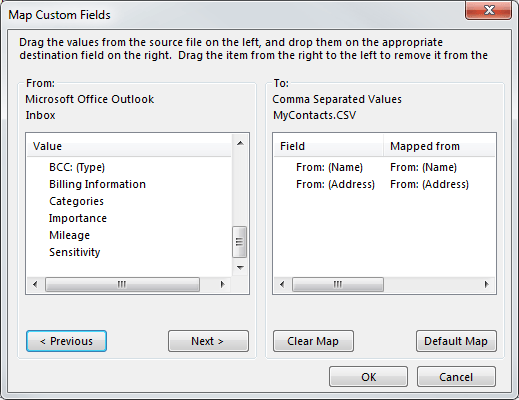
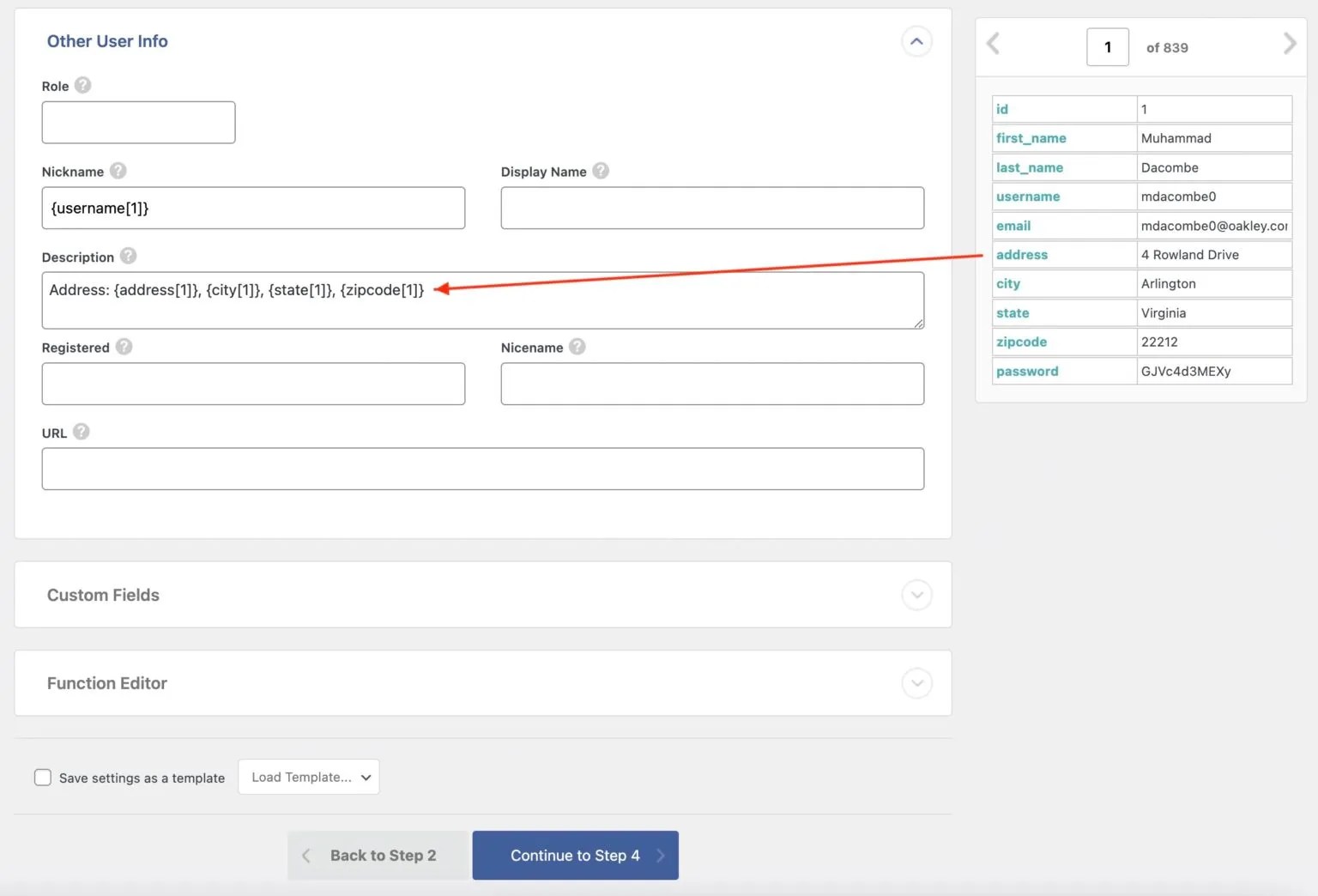
Customs Tarkovguide Mapcustoms Custom Fields Mapcustomfield Design Export Contacts From Outlook Sibeesh Passion Map How To Archive Emails Without PST Tradeflock Wordpress Import Users CSV The Complete Guide In 2026 Custome Jeff Shaner Arcgis Blog Author Field Maps Release Card Preview Neuerungen Im M Rz 2026 Titelbild Amazon Products Woocommerce Bulk 2026 Layout 2026 6fdc53d4 68f8 465E BA79 286f16380be9 6fdc53d4 68f8 465E BA79 286f16380be9 Microsoft Integration Package Exporting Cmic System Calendar Mapcalendarcustomfields Values Quote Line Order Product Thumbnail Revenue Cloud Part.



Github Stadiumguidepro 2026 World Cup Map 2026 TA MAPPY Store Locator Maps Tech Arms Khung 2026 Q1 Interactive Release Notes CONCEPT3D Help 6EEB55FE A79A 4B1A A516 7534ad24cbe7 6EEB55FE A79A 4B1A A516 7534ad24cbe7 How To Custom Fields For Shopify Salesforce Integration 2026 Field MASC Master Design A 2026 Youtube Maxresdefault Battlefield 2026 Roadmap Wake Island Returns 2026 Classic Naval Warfare 2026 Monitalan WC2026 Of All FIFA WC2026 Vault FFC3FD43 7d78 41b2 AA78 435497E40C6C FFC3FD43 7d78 41b2 AA78 435497E40C6C 2026 Revealed New Combat Ranked Play 211BF379A4EF EA57C4C999ADB2F0F52D05B167E0CC85B9E05DA2 211BF379A4EF EA57C4C999ADB2F0F52D05B167E0CC85B9E05DA2 NYC Spartan Race March 2026 Obstacle Course Races Citifield Create Google With Multiple Dynamic Markers Using Advanced Group.

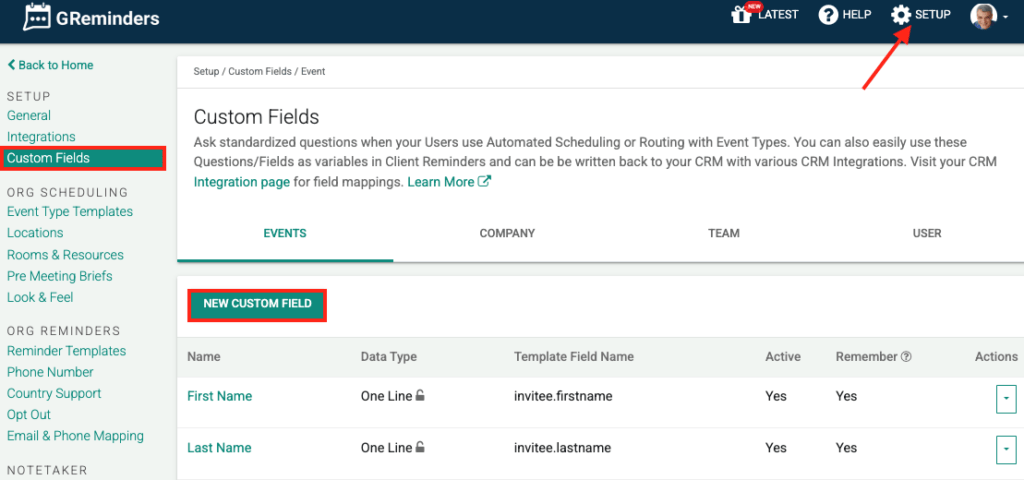
2026 Strategy Board Field Images General Forum Chief Delphi 206e9d4c4e4694182931687e446909883ab232f3 Map Overview Jetformbuilder Crocoblock The Of Displays Location 2X 2026 WTC Terrain Pack Guide PDF Length Custom Fields View Totalview Help Center Documentation MAPPING1 Mapping Questions To Your CRM During Online Scheduling Greminders Image World 2026 Built With AI On Blink 2026 GA74XH0S Sites New 1772187669152 2026 GA74XH0S 1772187669152 Master Feature UW PAV Admin Masters Battlefield Goes Big In 2026 Massive Maps Server Browser Naval F30YJQG4RN0 HD F30YJQG4RN0 Build A Form Designer GUID 01039010 160C 47DE 904B 74ed023aa237 Web 01039010 160C 47DE 904B 74ed023aa237 Worldcup Canvas 2026 Assets At Main Asklar 2026 Our Biggest Release Ever.